Showing posts with label Microsoft Technical. Show all posts

Thursday, March 5, 2009

OOP: ObjPaint-03 - Xử Lý Sự Kiện Chuột

PHẦN 3: XỬ LÝ SỰ KIỆN CHUỘT


1. Chặn sự kiện chuột WM_LBUTTONDOWN trên vùng Client
1.1. Gọi cửa sổ ClassWiazrd

Có thể thực hiện bước này ở 2 dạng:
+ Menu: View / ClassWizard
+ Phím tắt: Ctrl + W


Hình 1.1: Gọi cửa sổ ClassWizard

1.2. Bổ sung hàm chặn xử lý WM_LBUTTONDOWN.


Hình 1.2: Cửa sổ ClassWizard để thêm hàm chặn sự kiện

Có thể thực hiện bước này ở 2 dạng:
+ Double click trực tiếp lên message WM_LBUTTONDOWN
+ Để con trỏ chuột lên WM_LBUTTONDOWN, rồi nhấn button AddFunction, rồi nhấn button EditCode.
Hàm chặn sự kiện chuột mới tạo ra năm trong vùng viền đỏ của Hình 1.3.


Hình 1.3: Hàm CObjPaintView::OnLButtonDown


Việc chặn xử lý sự kiện WM_LBUTTONDOWN sẽ tạo ra 3 đoạn lện sau:
CODE1: Khai báo hàm chặn sự kiện trong file HEADER ObjPaintView.h.


// Generated message map functions
protected:
//{{AFX_MSG(CObjPaintView)
afx_msg void OnLButtonDown(UINT nFlags, CPoint point);
//}}AFX_MSG
DECLARE_MESSAGE_MAP
()


CODE2: Khai báo MACRO chặn xử lý sự kiên trong file implementation ObjPaintView.CPP.

BEGIN_MESSAGE_MAP(CObjPaintView, CView)
//{{AFX_MSG_MAP(CObjPaintView)

ON_WM_LBUTTONDOWN()
//}}AFX_MSG_MAP
// Standard printing commands
ON_COMMAND(ID_FILE_PRINT, CView::OnFilePrint)
ON_COMMAND(ID_FILE_PRINT_DIRECT, CView::OnFilePrint)
ON_COMMAND(ID_FILE_PRINT_PREVIEW, CView::OnFilePrintPreview)
END_MESSAGE_MAP()


CODE3:
Định nghĩa xử lý hàm xử lý sự kiên trong file implementation ObjPaintView.CPP.

///////////////////////////////////////////////////////////////////
// CObjPaintView message handlers

void CObjPaintView::OnLButtonDown(UINT nFlags, CPoint point)
{
// TODO: Add your message handler code here and/or call
CView
::OnLButtonDown(nFlags, point);

}


1.3 Bổ sung xử lý cho sự kiện WM_LBUTTONDOWN.


Dữ kiện ban đầu: Trong hướng dẫn Phần 2, chúng ta đã có được một đối tượng CLine m_ln1 được lưu trữ trong lớp CObjPaintDoc.

Giả định: Khi nhấn chuột, chúng ta sẽ thay đổi tọa độ bắt đầu của đối tượng CLine m_ln1 trong lớp CObjPaintDoc và để cập nhật hình vẽ thì gọi hàm cập nhật vùng CLIENT.

///////////////////////////////////////////////////////////////////////// CObjPaintView message handlers

void CObjPaintView::OnLButtonDown(UINT nFlags, CPoint point)
{

// TODO: Add your message handler code here and/or call
//Khoi gan gia tri bat dau cua LINE
GetDocument()->m_ln1.m_pt1.x = point.x;
GetDocument()->m_ln1.m_pt1.y = point.y;

//Goi cap nhat vung CLIENT ==> MFC tu dong goi ham OnDraw
Invalidate();

CView
::OnLButtonDown(nFlags, point);
}

Như vậy, sau khi thêm các lệnh cho sự kiện click chuột, chương trình cuối cùng đã có thể vẽ đối tượng linh động một phần (PT1 trong LINE). Để đối tượng LINE linh động hoàn toàn theo thao tác vẽ, cần phải xử lý tiếp sự kiện WM_LBUTTONUP.

WM_LBUTTONUP sẽ xác định điểm PT2 của Line để có một đối tượng LINE hoàn toàn linh hoạt.


Hình 1.4: Hàm xử lý sự kiện WM_LBUTTONDOWN


2. Chặn sự kiện chuột WM_LBUTTONUP trên vùng Client

Tiếp trục thực hiện chặn sự kiện chuột WM_LBUTTONUP thao các bước tiến hành như phần 1.


Giả định:
Khi nhấn chuột, chúng ta sẽ thay đổi tọa độ bắt đầu của đối tượng CLine m_ln1 trong lớp CObjPaintDoc và để cập nhật hình vẽ thì gọi hàm cập nhật vùng CLIENT.

///////////////////////////////////////////////////////////////////////// CObjPaintView message handlers
void CObjPaintView::OnLButtonUp(UINT nFlags, CPoint point)
{

// TODO: Add your message handler code here and/or call
//Khoi gan gia tri ket thuc cua LINE

GetDocument
()->m_ln1.m_pt2.x = point.x;
GetDocument()->m_ln1.m_pt2.y = point.y;
//Goi cap nhat vung CLIENT ==> MFC tu dong goi ham OnDraw
Invalidate
();
CView:: OnLButtonUp (nFlags, point);
}

OOP: ObjPaint-02 - Tạo lớp & Sử dụng đối tượng

PHẦN 2: TẠO LỚP và SỬ DỤNG ĐỐI TƯỢNG
1. Add lớp mới
1.1. Tạo lớp


Hình 1.1: Click và tạo mới lớp


Hình 1.2: Cửa sổ tạo lớp CLine


Hình 1.3: File Header của CLine

1.2 Bổ sung thuộc tính cho lớp đối tượng


Hình 1.4: Click và bổ sung thêm biến thành viên cho CLine


Hình 1.5: Cửa sổ thêm biến thành viên


1.3 Add phương thức cho lớp đối tượng


Hình 1.6: Click và bổ sung thêm hàm thành viên


Hình 1.7: Cửa sổ thêm hàm thành viên Draw


Hình 1.8: Cửa sổ phần định nghĩa lớp

Ngoài ra, cần sửa hàm khởi tạo để có thể vẽ gì đó ra màn hình. (Hình vuông đỏ số 1)
Hàm Draw gọi vẽ một đoạn thẳng từ pt1 pt2. (Hình vuông đỏ số 2)
2. Khai báo đối tượng Line trong ứng dụng (CObjPaintDoc)

Đối tượng m_ln1 cần dược lưu trữ trong lớp CObjPaintDoc, vì đây là nơi lưu trữ dữ liệu cũa một document.


Hình 2.1: Click và bổ sung thêm biến thành viên cho CObjPaintDoc

Sau khi add thêm, file header sẽ có thêm 2 dòng này:

#include "Line.h" // Added by ClassView

CLine m_ln1;


Hình 2.2: Cửa sổ thêm biến thành viên m_ln1

3. Vẽ đối tượng LINE lên vùng Client

Hình 3.1: Cửa sổ định nghĩa hàm OnDraw trong lớp View


Việc vẽ lên CLIENT sẽ do hàm OnDraw của lớp CObjPaintView đảm nhận.

void CObjPaintView::OnDraw(CDC* pDC)
{

CObjPaintDoc* pDoc = GetDocument();

ASSERT_VALID(pDoc);


// TODO: add draw code for native data here
pDoc->m_ln1.Draw(pDC);

}


Ở đây, Document sẽ triệu gọi đễ lấy dữ liệu và in lên màn hình. Kết quả cuối cùng sẽ là:


Hình 3.2: Cửa sổ ứng dụng tạo ra khi OnDraw gọi vẽ đối tượng

Đối tượng chúng ta vẽ ra nằm trong hình vuông đỏ.

OOP: ObjPaint-01 - Tạo Project ObjPaint

PHẦN 1: TẠO PROJECTOBJPAINT


1. Mở ứng dụng Visual C++ 6.0

Hình 1.1: Cửa sổ chương trình Visual C++ 6.0

2. Tạo mới một project có tên ObjPaint theo dạng SDI

Chọn menu File / New (Ctrl + N)


Hình 2.1: Cửa sổ tạo mới một project


Hình 2.2: Chọn dạng ứng dụng là Single document (SDI)


Hình 2.3: Chọn dữ liệu hỗ trợ: None


Hình 2.4: Chọn dữ liệu hỗ trợ: None


Hình 2.5: Chọn các phần bổsung như toolbar, statusbar…


Hình 2.6: Chọn các phần bổ sung như toolbar, statusbar…


Hình 2.7: Kết quả các lớp được tạo ra.


Hình 2.8: Thông tin về project mới tạo ra.


Hình 2.9: Phần view của project đã tạo ra.

3. Biên dịch và chạy chương trình


Nhấn Ctrl+F5 để biên dịch và chạychương trình.


Hình 3.1: Cửa sổ chương trình đã xây dựng

4. Thông tin các lớp trong project:

4.1. CAboutDlg

Là lớp quản lý cửa sổ About của chương trình. Có thể xem dialog này bằng cách chọn menu Help / About.


Hình 4.1: Dialog About của chương trình.


Hình 4.2: Cửa sổ phần code của class CAboutDlg.


Hình 4.3: Cửa sổ phần resource của dialog About.

4.2. CMainFrame

CMainFrame quản lý các toolbar, statusbar và vùng client (CObjPaintView).


Hình 4.4: Cửa sổ code phần lớp CMainFrame


4.3. CObjPaintApp

CObjPaintApp là lớp khởi tạo toàn bộ ứng dụng.


4.4. CObjPaintDoc

CObjPaintDoc là lớp quản lý dữ liệu văn bản (nếu có) của project.

Trong trường hợp PAINT, các đối tượng có thể lưu trong lớp này.

4.5. CObjPaintView

CObjPaintView là lớp chính quản lý vùng client của SDI. Việc vẽ lên GUI đượcthông qua lớp đối tượng này.

Tuesday, August 26, 2008

ThreadPool

Tôi đang quan tâm đến vấn đề download dữ liệu từ NET, tuy nhiên làm tiểu trình như hiện tại download lần lượt bị cho là như thế không tốt vì sẽ rất lâu, hơn nữa không tận dụng được năng lực của NET cũng như xử lý của CPU. Giải pháp thay thế là sử dụng nhiều tiến trình download cùng một lúc. Keyword cho vấn đề này là THREADPOOL. Rất hấp dẫn đấy thế là lại có cái chuyên về công nghệ để vọc nữa rồi.

Lân la trên mạng thì được bác Google mách nhỏ là dùng ThreadPool thì có thể theo một số ví dụ đơn giản có sẵn từ đây. Thế là lại lần mò làm theo thôi. Cũng nhanh và ok lắm. Nhìn chuyên nghiệp và nhanh hơn hẳn phương pháp tuần tự trước.

Khai báo một phương thức chứa mã lệnh cần thực thi; phương thức này phải trả về void và chỉ nhận một đối số. Sau đó, tạo một thể hiện của ủy nhiệm System.Threading.WaitCallback tham chiếu đến phương thức này. Tiếp tục, gọi phương thức tĩnh QueueUserWorkItem của lớp System.Threading.ThreadPool, và truyền thể hiện ủy nhiệm đã tạo làm đối số. Bộ thực thi sẽ xếp thể hiện ủy nhiệm này vào hàng đợi và thực thi nó khi một tiểu trình trong thread-pool sẵn sàng.

Nếu ứng dụng sử dụng nhiều tiểu trình có thời gian sống ngắn hay duy trì một số lượng lớn các tiểu trình đồng thời thì hiệu năng có thể giảm sút bởi các chi phí cho việc tạo, vận hành và hủy các tiểu trình. Ngoài ra, trong một hệ thống hỗ-trợ-đa-tiểu-trình, các tiểu trình thường ở trạng thái rỗi suốt một khoảng thời gian dài để chờ điều kiện thực thi phù hợp. Việc sử dụng thread-pool sẽ cung cấp một giải pháp chung nhằm cải thiện tính quy mô và hiệu năng của các hệ thống hỗ-trợ-đa-tiểu-trình.

Có từng làm mới thấy rằng: ThreadPool đảm bảo được yêu cầu: chỉ cần cung cấp hàm thực hiện, hệ thống sẽ tự động gọi chạy. Chúng ta có thể cung cấp tham số quy định số tiểu trình chạy tối đa tại một thời điểm. Tuy nhiên, hạn chế của ThreadPool lại là các tiến trình khi đã cung cấp cho ThreadPool tức là đã ngoài tầm kiểm soát, không thể Abort / Pause hay Resume gì nữa, mà nó sẽ tự động Start theo tình trạng của hệ thống. Điểm này chính là hạn chế của ThreadPool, nên nếu muốn nó chạy hiệu quả thì chúng ta cần bổ sung một Thread thường trực, cung cấp thread cho ThreadPool, và trong các hàm xử lý, cần thêm một số điều kiện thoát khi mà môi trường thay đổi.

Mốt số đặc điểm của ThreadPool:
+ Tất cả các phương thức của ThreadPool đều là hàm tĩnh, truy cập thông qua lớp.
+ Các Thread đưa vào ThreadPool không bị giới hạn trong một lớp / đối tượng.
+ ThreadPool tự thân không có hàm Stop / Abort dành cho các Thread nó chứa.
+ Có thể quy định số tiểu trình chạy đồng thời thông qua hàm ThreadPool.SetMaxThreads.

Tham khảo:
[C#] Thực thi phương thức với thread-pool
C# Tutorial - Using The ThreadPool
ThreadPool Class

Saturday, August 9, 2008

Remote connect to SQL Server 2005 Express

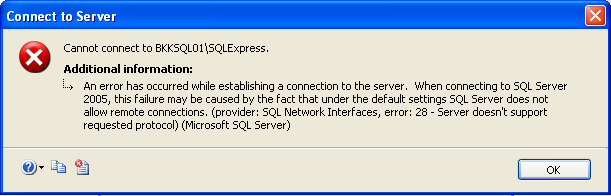
SQL Server 2005 không cho phép remote connection cho nên chúng ta cần phải active service này lên một cách thủ công. Message sau sẽ xuất hiện trong trường hợp service này chưa được start.

An error has occurred while establishing a connection to the server. When connecting to SQL Server 2005, this failure may be caused by the fact that under the default settings SQL Server does not allow remote connection. ….?"

SQL Server does not allow remote connection

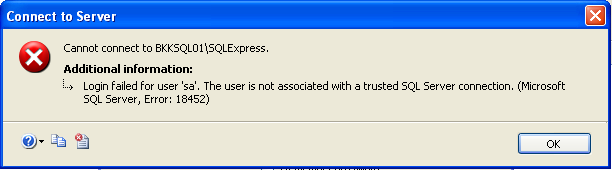
Login failed for user ‘sa’. The user is not associated with a trusted SQL Server connection.�?

Login failed for 'sa'

Kiểm tra quyền truy cập vào hệ thống SQL Server với account trong hệ thống của SQL Server hoặc quyền của Windows Authentication.
Ví dụ: tài khoản ‘sa’.

    1. Login vào SQL Server sử dụng công cụ SQL Server Management Studio Express trên hệ thống SQL Server với tài khoản của Windows Authentication.
      Login using Windows authentication mode on local
    2. Trong phần cửa sổ Object Explorer, click chuột phải trên tên server đã connect và chọn Properties.
      Open SQL Server Properties
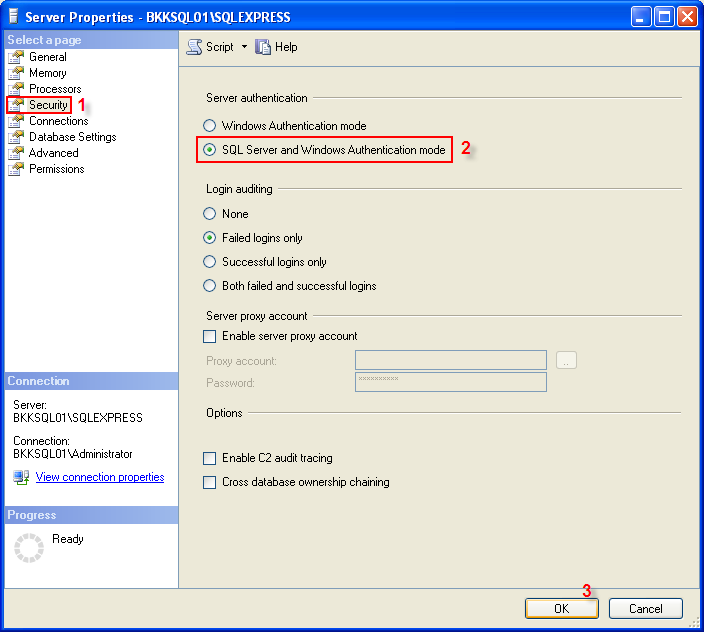
    3. Trên phần của sổ trái của cửa sổ Server Properties, chọn Security và thay đổi dạng truy cập Server authentication trở thành SQL Server and Windows Authentication mode.
      Change SQL Server authentication mode
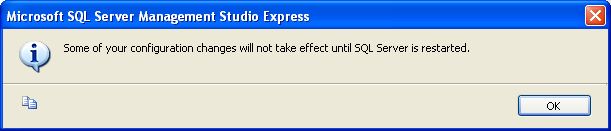
    4. Của sổ thông báo kết quả thay đổi đã thành công và yêu cầu restart lại SQL Server để làm cho những thay đổi trên có hiệu lực.
      SQL Server need restart
    5. Click chuột phải trên tên server, chọn Restart để restart lại dịch vụ SQL Server.
      Restart SQL Server Service
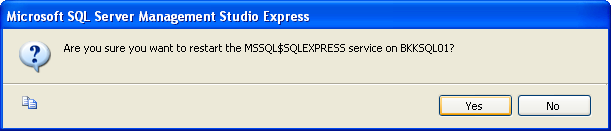
    6. Chọn Yes.
      Confirmation
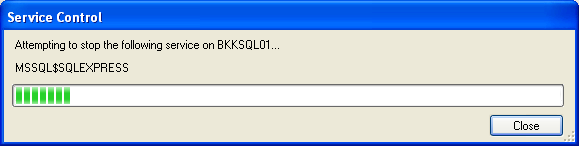
    7. Của sổ restart dịch vụ SQL Server.
      Restarting SQL Server Service
    8. Tất cả đã hoàn tất, dịch vụ SQL Server với quyền truy cập là tài khoản của SQL Server và Windows authentication đều đã được kích hoạt.
  • Kiểm tra dịch vụ remote connection vào server SQL trên công cụ SQL Server Surface Area Configuration
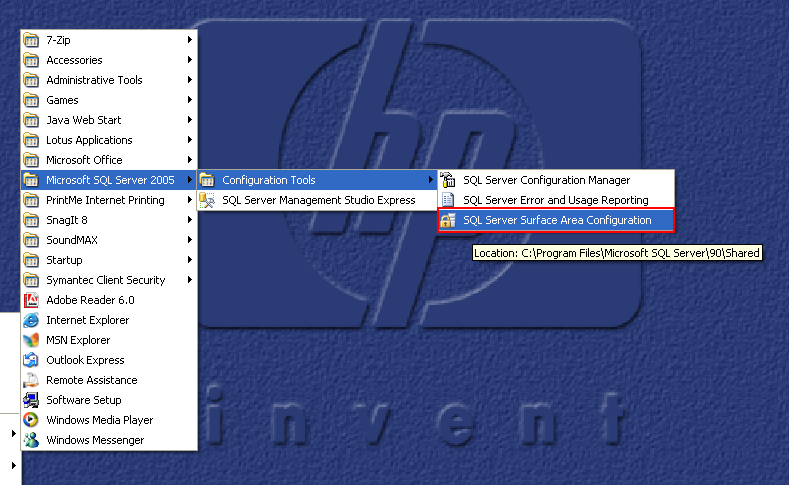
    1. Mở chương trình SQL Server Surface Area Configuration.
      Open SQL Server Surface Area Configuration
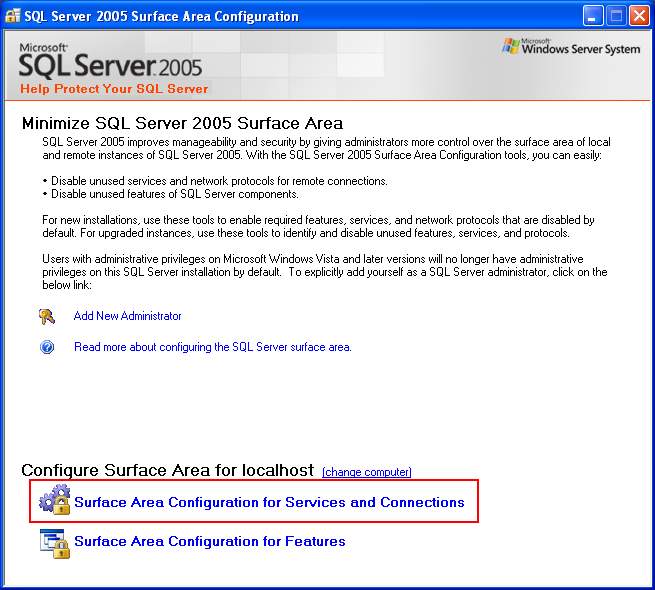
    2. Click vào chức năng Surface Area Configuration for Services and Connections (chọn lựa đầu tiên trong 2 chức năng).
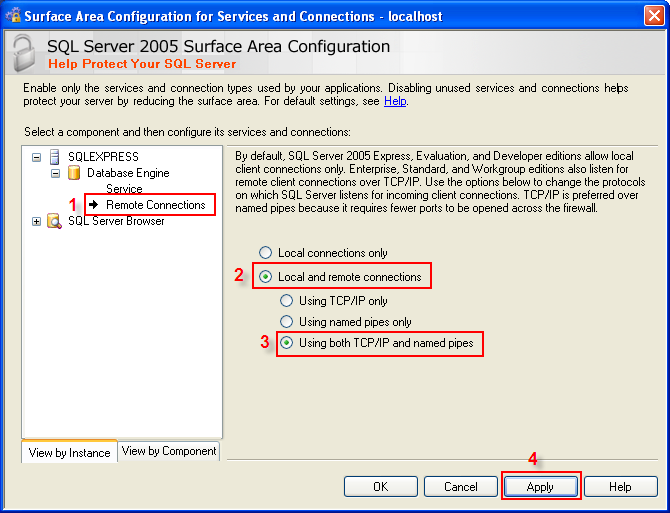
      Open Surface Area Configuration for Services and ConnectionsTrên phần cửa sổ bên trái của cửa sổ vừa mở ra, chọn SQL Server instance -> Database Engine -> Remote Connections. Trên phần bên phải, chọn Local and remote connections -> using both TCP/IP and named pipes.
      Allow remote connections
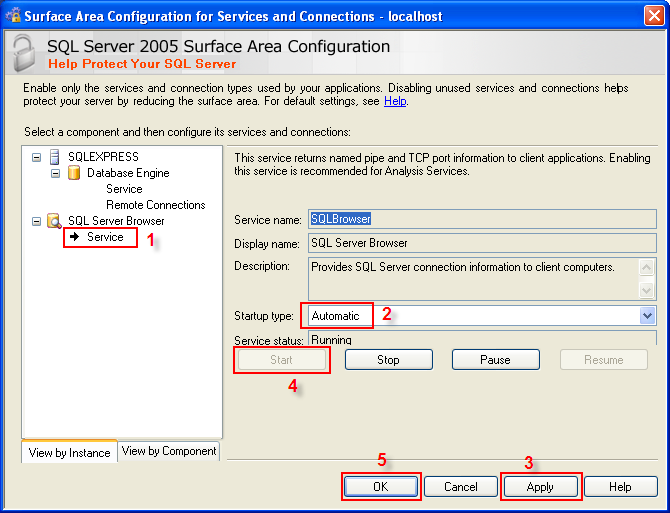
    3. Tiếp theo trên phần trái của cửa sổ, chọn SQL Server Browser -> Service.
      Trên phần phải của cửa sổ, Hãy start dịch vụ và để nó ở chế độ Automatic. Sau đó nhấn OK.
      Start SQL Server Browser
    4. Sau khi tiến hành các bước cấu hình trên, hệ thống đã có thể tiến hành remote connect từ một máy khác trong hệ thống mạng.
      Login to remote SQL Server
    5. Trang login.
      Login succeeded

Monday, August 4, 2008

SQL Server 2005 Express Edition

Keywords: SQL Server 2005 Express, SQLExpress, SQLServer2005, SQL2005,

1. Cài đặt .NET Framework 2.0
2. Cài đặt Microsoft SQL Server 2005 Express Edition
3. Cài đặt SQL Server Management Studio Express

SQL Server 2005 Express Edition (SSE) là phiên bản desktop của sản phẩm cơ sở dữ liệu SQL Server 2005 rất phổ biến của Microsoft. Phiên bản SQL Server 2005 Express Edition được cung cấp miễn phí cho người sử dụng.

1. Cài đặt .NET Framework 2.0

SSE đi với bộ công cụ phát triển phần mềm Visual Studio.NET 2005 nên yêu cầu cần phải có .NET Framework 2.0. Link download .NET Framework 2.0: http://msdn2.microsoft.com/netframework/

2. Cài đặt Microsoft SQL Server 2005 Express Edition

SQL Server 2005 Express Edition là phiên bản desktop làm server dữ liệu SQL trên máy PC x86. SSE có đặc điểm là miễn phí, dễ sử dụng, kích thước file cài đặt nhỏ gọi chỉ với 36.5MB.

Link download : http://go.microsoft.com/fwlink/?LinkId=65212

3. Cài đặt SQL Server Management Studio Express

SQL Server Management Studio Express để dễ quản lý database, nó giúp bạn tạo database dễ dàng hơn. Trường hợp không cần công cụ quản lý dữ liệu thì không cần cài đặt phần này.

Link download: http://go.microsoft.com/fwlink/?LinkId=65110

Trước khi cài cần phải có MSXML 6.0.

(Link download : http://www.microsoft.com/downloads/details.aspx?familyid=993c0bcf-3bcf-4009-b...)


4. Câu lệnh kết nối đến SQL Express

SQLServer2000:

m_szConnectString.Format("Provider=SQLOLEDB;Data Source=%s; Trusted_Connection= yes; User Id = %s; Password=%s; Initial Catalog=%s", m_szServer, m_szUsername, m_szPassword, m_szDatabase);

SQLExpress2005:

m_szConnectString.Format("Provider=SQLNCLI; Server=HUNGNQ\\SQLEXPRESS; Trusted_Connection=yes; Database=%s; User Id=%s; Password=%s; Initial Catalog=%s", m_szUsername, m_szPassword, m_szDatabase);

m_szConnectString.Format("Provider=SQLNCLI; Server=HUNGNQ\\SQLEXPRESS; Persist Security Info=True; User Id=%s; Password=%s; Initial Catalog=%s;", m_szServer, m_szUsername, m_szPassword, m_szDatabase);

Tuesday, January 22, 2008

Ứng dụng C# gọi chương trình console mà không xuất hiện cửa sổ DOS

Trong quá trình lập trình, tôi sử dụng đến một chương trình DOS để thực hiện các tác vụ nền, vì là tác vụ nền nên không muốn nó hiển thị lên cửa sổ đen của DOS khi nó được gọi. Sau đây là cách thực hiện (môi trường C#):
// This code needs the "System.Diagnostics" library
// Application path and command line arguments
string ApplicationPath = "C:\\example.exe";
string ApplicationArguments = "-c -x";
// Create a new process object
Process ProcessObj = new Process();
// StartInfo contains the startup information of the new process
ProcessObj.StartInfo.FileName = ApplicationPath;
ProcessObj.StartInfo.Arguments = ApplicationArguments;
// These two optional flags ensure that no DOS window appears
ProcessObj.StartInfo.UseShellExecute = false;
ProcessObj.StartInfo.CreateNoWindow = true;
// If this option is set the DOS window appears again :-/
// ProcessObj.StartInfo.WindowStyle = ProcessWindowStyle.Hidden;
// This ensures that you get the output from the DOS application
ProcessObj.StartInfo.RedirectStandardOutput = true;
// Start the process
ProcessObj.Start();
// Wait that the process exits
ProcessObj.WaitForExit();
// Now read the output of the DOS application
string Result = ProcessObj.StandardOutput.ReadToEnd();

Sunday, January 6, 2008

Hiện thực hóa kiến trúc SOA với .NET

(Realizing a Service-Oriented Architecture with .NET)
Web Services have emerged as a key strategic capability for integrating business processes, data, and organizational knowledge.

This article is meant to be a practical discussion guide to building a .NET application in a service-oriented architecture. We will consider real-world goals, real-world obstacles, and experience-based solutions. I quickly concede the approaches discussed here are not exhaustive or infallible. This paper is focused on application development, not application integration. We will specifically consider architectural issues and component design issues.

The Potential of Web Services

So why all the hype? Web Services obviously have great potential. It's a way to integrate at many different levels. Consider this example. A single consumer application (perhaps interacting with your company over the Internet) wants to engage the company in some business process. To facilitate that business process, the company internally invokes processing that spans two discreet systems (A and B). However, through a service-oriented architecture, the entire end-to-end business process is exposed to the consumer application as a single service.

Hình ảnh
Figure 1. Exposing separate LOB applications as a single service.

Architectural Considerations

A good architecture emphasizes a separation of responsibilities. For example, the presentation tier manages presentation components; the business logic tier manages business logic components; and the data access tier manages data access components.

This separation provides for fault tolerance, easier maintenance, and future-proofing. A good service-oriented architecture is nothing new, just a smart way of separating (and exposing) a component's responsibilities. It builds on classic object-oriented (OO) ideas.

In a service-oriented architecture, clients consume services, rather than invoking discreet method calls directly. In a 3-tier model (Figure 2), objects are marshaled across process boundaries through the proxy/stub techniques we know from COM. This provides benefits such as location transparency. The same techniques are used in .NET Remoting via channels and sinks. The basic philosophy is that one tier should only communicate with the tier contiguous to it.

One disadvantage to object-orientation at an architectural level is the number of communication links. Client code is responsible for traversing complex object models and understanding details about domain-specific logic. In a service-oriented model, we introduce a further "layer of indirection". This alleviates some of the pain associated with traversing complex object models. The services layer, denoted below in Figure 3 by the cloud, provides black-box functionality.

Hình ảnh
Figure 2. A typical 3-tier application architecture

Hình ảnh
Figure 3. A service-oriented application architecture

Designing Services and Objects

In a service-oriented design, services should be course-grained. Course-grained services are modeled after and align to business processes.

Objects should be fine-grained and align to real business entities. These discreet objects provide the detailed business logic. Specificity is good when building discreet business objects. This is also a very successful way to codify organizational knowledge. Each business object is responsible for its own behavior and business rule implementation, such as updating a database table, sending an email, or placing a message on a queue.

Services provide the orchestration of the detailed business objects to expose a full service to the consumer. Services are responsible for orchestrating calls to discreet business objects, managing the responses, and acting accordingly. Service methods may invoke and manage several business objects.

Service methods align to business processes by design. Class methods align to detailed object-level operations by design.

Consider the following example in Figure 4. Notice we have a Web service called BookStoreService and a Web method called orderBook(). This single Web method instantiates and manages 3 separate objects, Book, Order, and OrderDetail.

Hình ảnh
Figure 4. Designing services and objects.

Design Considerations

Minimize Roundtrips

A design goal should be to design services to minimize round-trips. This was true with COM and it continues to be true with .NET and Web Services.

Recall in classic n-tiered distributed architectures that conventional wisdom said it was better to move 1000 bytes across process boundaries 1 time, rather than moving 1 byte across 1000 times. We would optimize method signatures and design stateless components, and we would use database helper routines to convert ADO recordsets to XML to provide a lightweight payload for distributed applications.

With SOAP and Web Services, we generally see the same approach. However, we need to take it one step further. We should now consider using the Web Service as a service, not just a data pump, and XML as a self-describing package, not just a payload.

Align Web Methods to Forms

Web methods should be designed to perform an entire service for an entire form. In short, our design goals are:

Provide a course-grained Web method at the form level
Have the Web method invoke whatever business objects it needs
Return to the consumer the whole service result, like a DataSet with numerous tables within it

Consider the following example. We may be designing a search form to search a bookstore for certain titles. To support this search screen in this figure, we would design a Web method called GetSearchScreenInfo which returns a DataSet that has a number of tables within it. This Web Method is designed to provide all the information the form needs to draw itself on the load event.

Hình ảnh
Figure 5. Align service methods to forms

On this particular form, we need two lists just to populate the screen: a list of valid publishers, and a list of valid categories. Rather than making two calls to the Web Service (one for each dropdown), we design our Web method to provide everything we need in a single call. We service the loading of the search form in a single interaction. Later work, such as performing the search or drilling into details, is handled by separate Web methods.

Behind the scenes, our web method is invoking and managing all the business objects it needs to satisfy the request.

Moving Data Between Tiers

Data can be moved between architectural tiers as DataSets, serialized objects, raw XML, etc. -- but design your solution to be consumed. DataSets are .NET specific objects that serialize nicely but are intended for other .NET applications. If your application needs to interoperate with, for example, a J2EE solution, DataSets may be too troublesome to employ because the J2EE side would not readily understand a DataSet.

Serializing business objects is also an option. But remember that the full object is not marshaled. The object's public properties and data members are serialized and shipped, but the calling client cannot re-inflate the object and access its private data members or methods.

XML is, of course, an obvious choice also. XML formatted exchanges are a solid and proven technique for moving data around any distributed architecture.

Distributed Transactions

Web methods can act as the root of a distributed transaction. These transactions are managed by the Distributed Transaction Coordinator (DTC). Our Web Service classes must reference the System.EnterpriseServices namespace, and can then use the ContextUtil class to use the SetAbort() and SetComplete() methods. This provides for declarative transaction control.

Each object enlisted by the Web method is a child object and will participate in the transaction and "vote" on the outcome. This provides the best fit for keeping objects granular enough to manage their own data from a persistent store, while still allowing them to be orchestrated by a transaction-root controller.

Transactional context is managed by the root. Web Methods must be adorned with the TransactionOption attribute, something like this:

Mã:
[WebMethod(TransactionOption=TransactionOption.RequiresNew)]


Child objects need nothing special. They do NOT need to derive from the ServicedComponent base class. The same child object can be enlisted in a transaction for one Web method, but not enlisted in a transaction for another Web method.

Exception Handling

Exceptions should be considered a rarity. They should be thrown only in exceptional situations, not in normal branching. Each caller should catch exceptions and deal with them appropriately. In its simplest form, an exception could be bubbled up the call stack from the backend to the UI and presented to the end-user. However, each step up the stack should have processing done at that layer. All exceptions thrown over SOAP get shipped as SOAP exceptions. For example, we might throw an exception if someone tried to log on inappropriately using this simplified code:

Mã:
Throw New BadPasswordException()

The caller would need to catch that exception, like this:

Mã:
Catch x1 As BadPasswordException // do something

In this example, the caller catches the particular exception and reacts to it. However, if the Web Service threw an application exception to the end-user client, the exception is transformed into a SOAP exception. In fact, the client program must specifically catch that SOAP exception, as in Figure 6.

Mã:
catch e as System.Web.Services.Protocols.SoapException


Hình ảnh
Figure 6. Throwing exceptions over a SOAP connection.

The client program must catch at least 3 different types of exceptions. The first is SoapException.

On the client, SoapExceptions should be caught for any middle-tier exceptions. This is useful for throwing exceptions from the middle tier application logic. However, ANY middle tier exceptions will be thrown as a SoapException.

We can encode the inner exception to be business-problem specific information we need. As an example, we can pass a SoapException with a meaningful message, such as "Database access error", so that the client can deal with it.

Next the client should catch WebExceptions. This is useful when the network goes down in the middle of an end-user's session.

Finally, the client must catch client-side exceptions. These are thrown by client-side processing, and are something local to client, like FileNotFound.

Conculsion

The key messages to take away from this discussion about constructing .NET applications in a service-oriented architecture are as follows:

Service-oriented architecture is rooted in object-orientation but adds a layer of abstraction. I like to think that service-orientation is not a departure from object-orientation, but rather an evolution. Services orchestrate calls to discreet business objects to satisfy requests. Objects are enlisted, behind the scenes, to formulate a response.

The openness of the technologies is exciting and easy to use. The current industry work on standards around UDDI, WSDL, Web Services, etc. promises that more and more applications can be constructed from constituent services rather than re-invented domain-specific code.

The statelessness of the technologies can be a challenge for performance heavy applications. Be aware of the non-functional requirements of the solution you want to build. Sometime line-of-business applications desire long-running transactions that are better suited to other distributed application technologies.

Design your solution for Web Services - you will have different approaches than you would for Remoting or DCOM. Again, remember that service-orientation is appropriate for some business applications, but not all. A service-oriented architecture is one possible architecture pattern to consider when designing solutions.
(Chip Irek)